Create and use tags
How to create tags in FileEazy, choose where each tag can be used, and add tags to files and folders so documents are easy to group and find.
Folders put a document in one place. Tags let you label it in as many ways as you need. A contract can sit in a client's folder and also be tagged Contract and Confidential, so you can find it by type, by sensitivity or by client.
Create a tag
- Select Tags in the main menu.
- Select New Tag at the top right. A panel opens.
- Enter a Tag Name. Add a Tag Description if the name needs explaining. You can write both in English and Japanese. Tick Use same values for all languages if one version is enough.
- Under Tag Modules, tick the areas where the tag can be used: File, Folder, List, Data, Task, Workflow, Form or App. Select All ticks every one.
- Leave Active on, or switch it off to hold the tag back until it is needed.
- Select Save & Close.
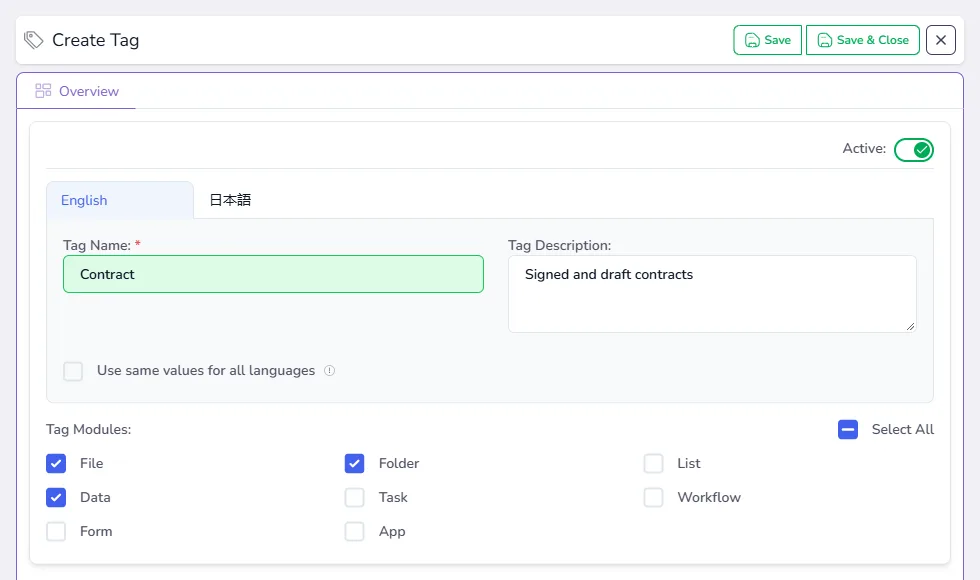
Choosing modules keeps pick-lists short. A tag meant for contract files will not clutter the options when someone tags an app.
The Tags page
Each tag is a card with its name and description. The panel on the left has:
- All Tags: every tag.
- Recycle Bin: deleted tags, which can be restored.
- Audits: a record of who created or changed tags.
Use the switch on a card to turn a tag on or off, and Search or Filters to find one in a long list.
Add tags to files and folders
- Open the File Manager.
- Select the actions button on a file or folder, then Tags.
- Choose one or more tags from the list.
- Save.
You can also add tags during an upload: the Upload Files window has an optional Tags section, and the tags apply to every file in that upload. See Upload your first documents.
Tips
- Agree on a short list. Ten clear tags are more useful than a hundred overlapping ones.
- Use tags for what folders cannot express. Folders suit the main place a document belongs. Tags suit type, status or sensitivity.
- Name them as the team talks. If everyone says "NDA", do not call the tag "Non-Disclosure Agreement".
- Switch a tag off instead of deleting it when you stop using it, so older items keep their labels.