Billing and subscription - change plan, cancel, renew and see your invoices
See your plan, usage and next payment, upgrade or downgrade, cancel or renew your subscription, and find every invoice, from Settings, Billing in FileEazy.
Billing is where you manage your FileEazy subscription: which plan you are on, when you are next charged, how much of your plan you are using, and every invoice so far. To change the plan, cancel or renew, you pay on the payment provider's own secure page, so FileEazy never sees your card details.
To open it, select Settings in the main menu, then Billing. The ? at the top right opens this guide.
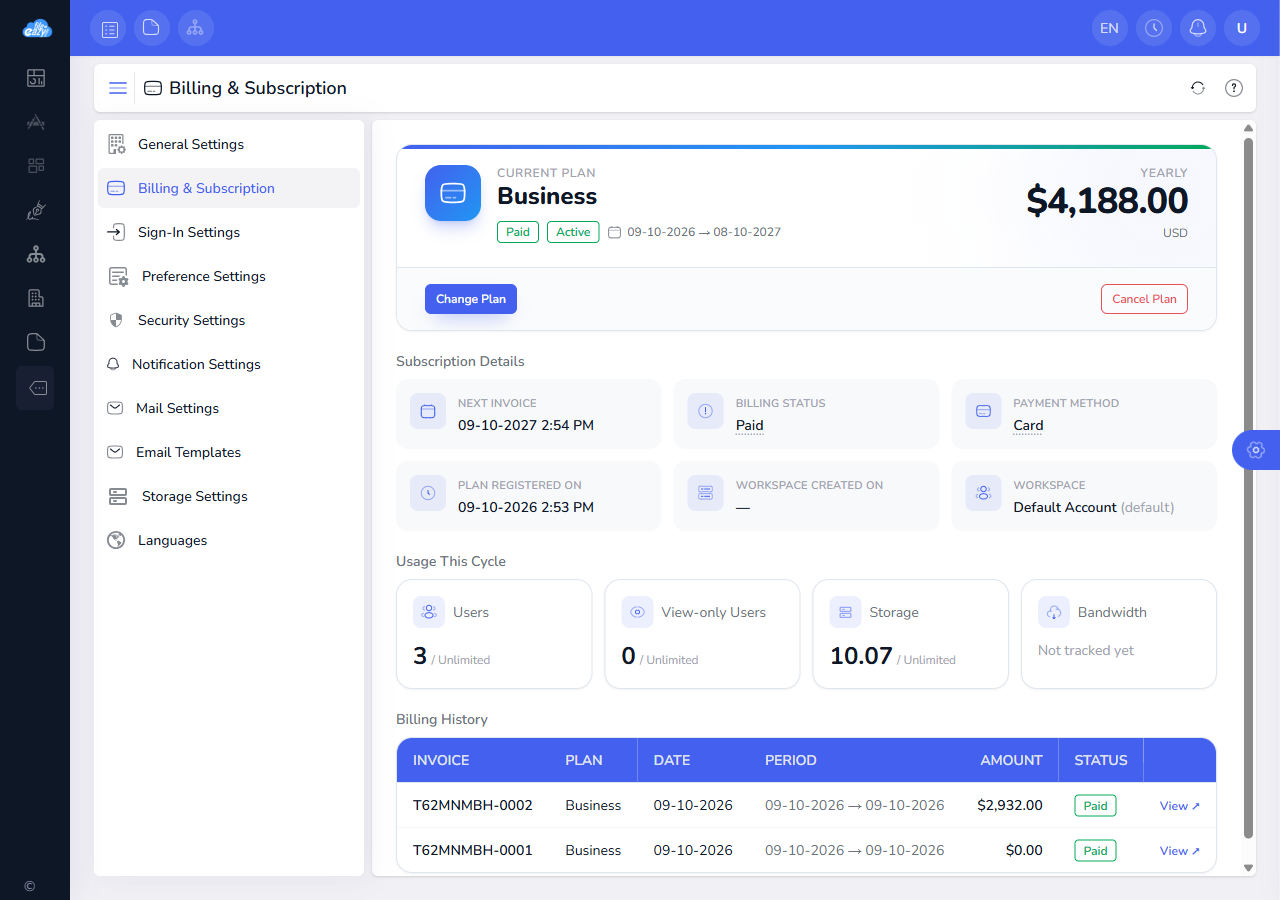
What the Billing screen shows
The top of the page tells you where your subscription stands.
| What you see | What it means |
|---|---|
| Plan and Billing cycle | The plan you are on, and whether it is billed Monthly or Yearly. |
| Billing status | A coloured badge, explained below. Hover over it for a short description. |
| Period | The billing period you are in now, from its first day to its last. A renewal starts the next one. |
| Next invoice or First payment on | When you are next charged, or invoiced if you pay by invoice. |
| Plan registered on and Workspace created on | When the subscription was set up and when your workspace was created, with the time. |
| Usage This Cycle | Users, view-only users and storage used against what your plan includes. |
Subscription status
| Status | What it means |
|---|---|
| Trialing | You are in your free trial. Nothing has been charged yet. The first payment date is shown. |
| Paid | Your subscription is paid and active. |
| Past due | A payment did not go through. See If a payment fails. |
| Cancels at period end | You have cancelled. Everything keeps working until the period ends. |
| Cancelled, Refunded | The subscription has ended. The workspace is read-only for a while, then locked. See Renew your subscription. |
| Terminated | The account was closed because a payment stayed overdue. Renew to restore it. |
Change your plan
Select Change Plan, choose a plan and a billing cycle, and FileEazy shows exactly what will happen and what it will cost before you confirm. Nothing changes until you select Confirm change.
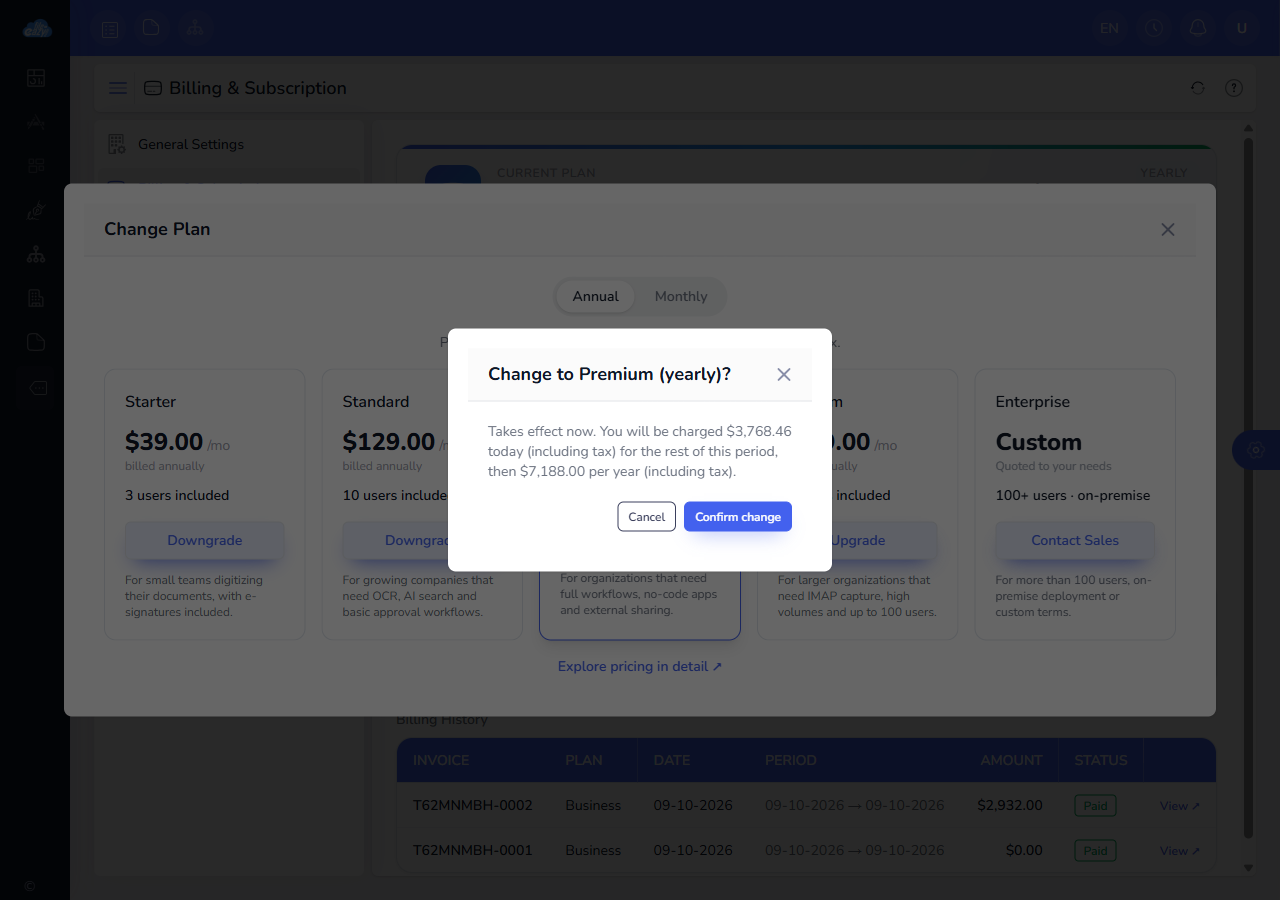
Upgrade
An upgrade takes effect straight away. You are charged now for the difference for the days left in the current period, to the card or invoice you already use, and your next payment is at the new price. Moving from monthly to yearly starts a new year today, with the unused part of your month taken off.
Downgrade
A downgrade starts at your next renewal, and nothing is charged now. Until then you keep your current plan. The billing page shows the change that is waiting, and you can select Cancel change to keep your current plan.
FileEazy refuses a downgrade if your workspace already uses more than the new plan allows, such as more users or more storage. The message shows how many you use and how many the new plan allows. Reduce your usage, then try again.
During your trial
While you are in your trial, a plan change takes effect at once and costs nothing. Your trial end date stays the same. The billing cycle can be changed once the trial has ended.
Two things cannot be changed here: the currency of a subscription, and plans that are quoted to your needs. For those, choose Contact Sales.
Cancel your subscription
- Select Cancel Plan.
- Choose when it ends: at the end of the period, or, on a yearly plan that is paid and part-way through its term, now with a refund. For a refund, FileEazy shows the amount before you confirm. The months you have used are recalculated at the monthly rate, with part months counted as a full month, and the rest of what you paid is refunded.
- Tell us why you are leaving. This helps us improve, and you can add anything else you want us to know.
- Type the workspace name to confirm, and select the button.
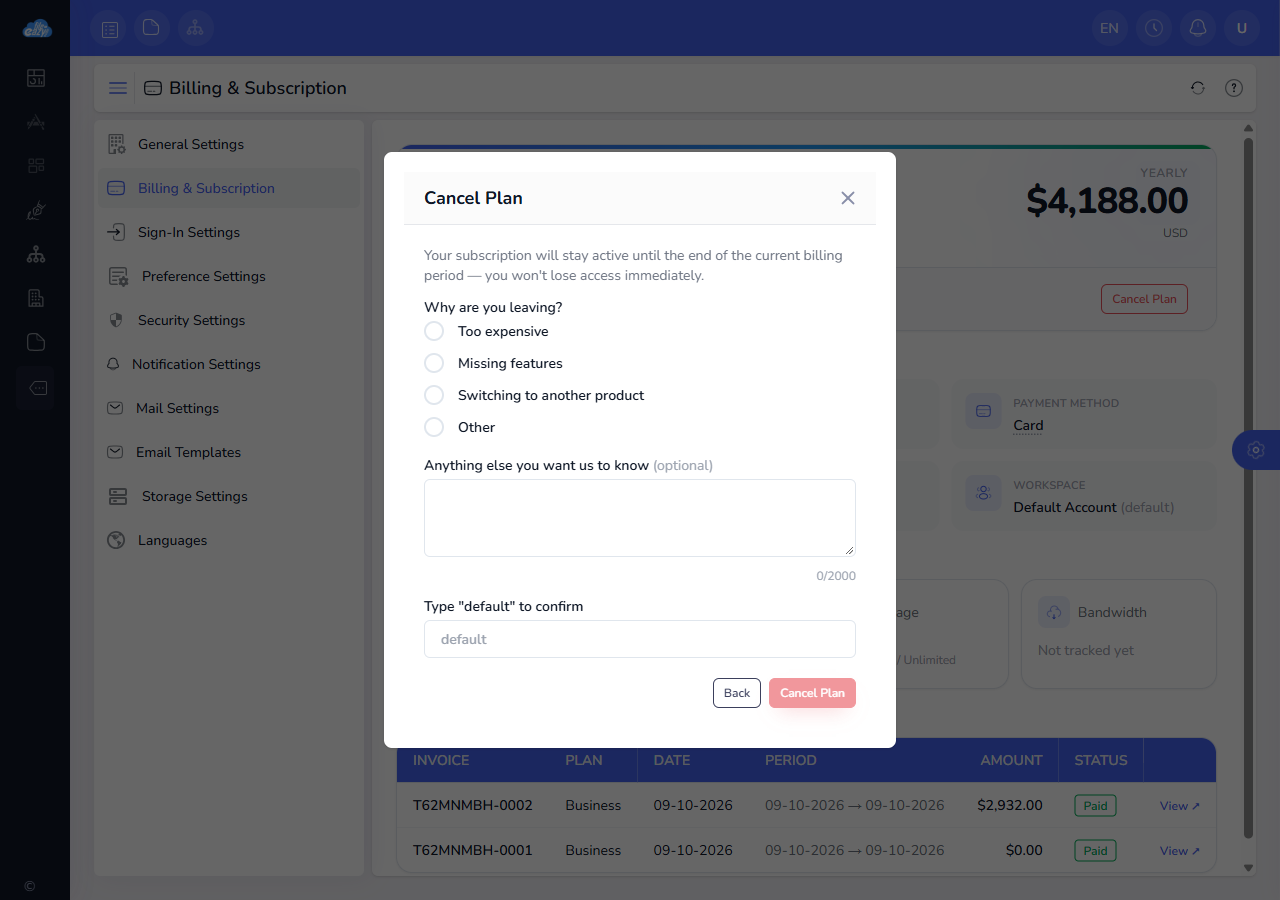
After you cancel at the end of the period, nothing more is charged. You keep full access until the period ends. To change your mind before then, select Undo cancellation. If you pay by auto-pay in India, a cancellation cannot be taken back, so renew after the period ends instead.
When a subscription ends, the workspace becomes read-only for 30 days: everyone can still see and download their files, but nothing can be changed. After that it is locked. Your data is kept safe, and it all comes back when you renew.
Renew your subscription
If your subscription has ended, or the account was closed, select Renew on the Billing page or on the lock screen.
- Choose the billing cycle if you want to change it. Your plan, users and storage stay as they were.
- You go to the payment provider's own page and pay. There is no new trial: you are charged at once.
- You come back to FileEazy, and your workspace returns to Paid with everything as you left it.
If you pay by invoice, you receive the invoice and pay it by bank transfer or through its payment link. The workspace comes back when the payment arrives.
Billing history and invoices
Billing History lists every payment, newest first, with the Date, the Plan it was for, the Period it covers, the Amount with tax and the Status. Each row links to its invoice. An invoice keeps the plan it was issued for, even if you changed plans later.
If you pay by invoice, an invoice is sent to you before the period ends, and you can pay it from the link in the email. In India, you receive a GST invoice about 10 days before the period ends.
If a payment fails
If a payment does not go through, the status changes to Past due and a banner shows the date by which you need to pay. Your workspace keeps working normally during this time, which is 14 days.
- Check that your card is valid and has enough funds. Stripe retries a card payment over the next few days.
- If you pay by invoice, pay the invoice that was sent to you.
- If you cannot fix it in time, contact support.
If the payment is still missing after 14 days, the account is closed and the workspace is locked. You can still renew to bring it back.
Who can manage billing
Billing is for the administrators who manage your subscription. Other users can see the banner when a subscription needs attention, but the Billing page tells them that only administrators with billing access can manage it. To give someone access, see Roles and permissions.
Tips
- Check Usage This Cycle before you downgrade. It shows how close you are to your plan's limits.
- A cancellation does not take effect until the period ends, so there is no need to rush: you can undo it until then.
- Keep the email address on your account up to date. Invoices and payment reminders are sent there.